
All Advance Ticket Purchases Will Be Managed Digitally
(APRIL 2, 2026 | PEORIA, IL) – As Peoria City prepares for its fifth season of exciting pre-professional soccer in 2026, the USL League Two club has partnered with vivenu, a leading technology provider in global event ticketing, to modernize and simplify the ticket purchasing and redemption process for Flying Carp fans and supporters.
In addition to Peoria City’s newly-refreshed website, the club has worked with vivenu to develop a new ticketing website and purchase flow accessible by visiting https://peoriacitysoccer.com/tickets/. Single game and season tickets will be delivered via email with mobile tickets available for transfer, download into digital wallets or for printing.
About vivenu
vivenu is the technology leader in global event ticketing, offering a flexible and advanced ticketing platform tailored to organizers’ brands, sales and unique business needs. Leading organizers make the most of their ticketing with vivenu’s full-service support and a platform designed for customization, reliability and connectivity. Its white-label platform gives organizers worldwide full control over their ticketing experience and customer data, turning ticketing into a key business asset. With offices in Europe and North America, vivenu supports 800+ premier event enterprises in 40+ countries and is trusted by notable brands like the Grammy Awards, HYROX, Stanford Athletics, The Special Olympics and many more. For more information, please visit vivenu.com, or send a press inquiry to media@vivenu.com.
New Customers
Please use the instructions below to set up your account
Set Up Your New Account
- Navigate to the Peoria City Tickets page by clicking the “Tickets” menu at PeoriaCitySoccer.com.
- Click the “Peoria City vivenu Tickets Portal” button in the Ticket Information paragraph.
- Once on the ticketing site, click the “Sign In” button at the top right corner.
- From the “Sign In” prompt, select “Register For Free” and complete all required fields.
- Check your email inbox for an account verification email and follow the instructions provided in that email to complete the process.
- Select the category you wish to purchase (scroll down to see individual game events)
Access Tickets/View Mobile Wallet
- Navigate to the Peoria City Tickets page by clicking the “Tickets” menu at PeoriaCitySoccer.com.
- Click the “Peoria City vivenu Tickets Portal” button in the Ticket Information paragraph.
- Sign in to your ticket account.
- Click your name in the top right corner and select “Orders.”
- From here, you can see the upcoming events by scrolling up and down.
- Select the event you would like to manage.
- Choose “Add to Wallet (Apple or Google) on the ticket(s) you want to store.
- All mobile tickets will have bar codes that will be scanned upon entry.
Fans are encouraged to download their mobile tickets as soon as possible after completing their purchase and before arriving at the event. Tickets stored in your mobile wallet will automatically update when game times are set, can be easily opened from your device’s home screen on the day of the event, and do not require Wi-Fi or cellular service to be accessed. Screenshots will not be accepted for entry.
Ticket Transfers
No longer able to attend an event? All new! Transfer your ticket to a friend or colleague so they can enjoy a Peoria City event!
- Navigate to the Peoria City Tickets page by clicking the “Tickets” menu at PeoriaCitySoccer.com.
- Click the “Peoria City vivenu Tickets Portal” button in the Ticket Information paragraph.
- Sign in to your ticket account.
- Click your name in the top right corner and select “Orders.”
- From here, you can see the upcoming events by scrolling up and down.
- Select the event you would like to manage.
- Select “Transfer” on the event you would like to transfer.
- Enter the email address of the person to whom you would like to transfer the ticket(s).
- Tap “Submit” to initiate the transfer.
Once your transfer has been sent, the recipient will receive an email with a link to accept the transfer. They will not be required to create an account. You may cancel the transfer at any time until it is accepted.
Game Day Ticket Sales
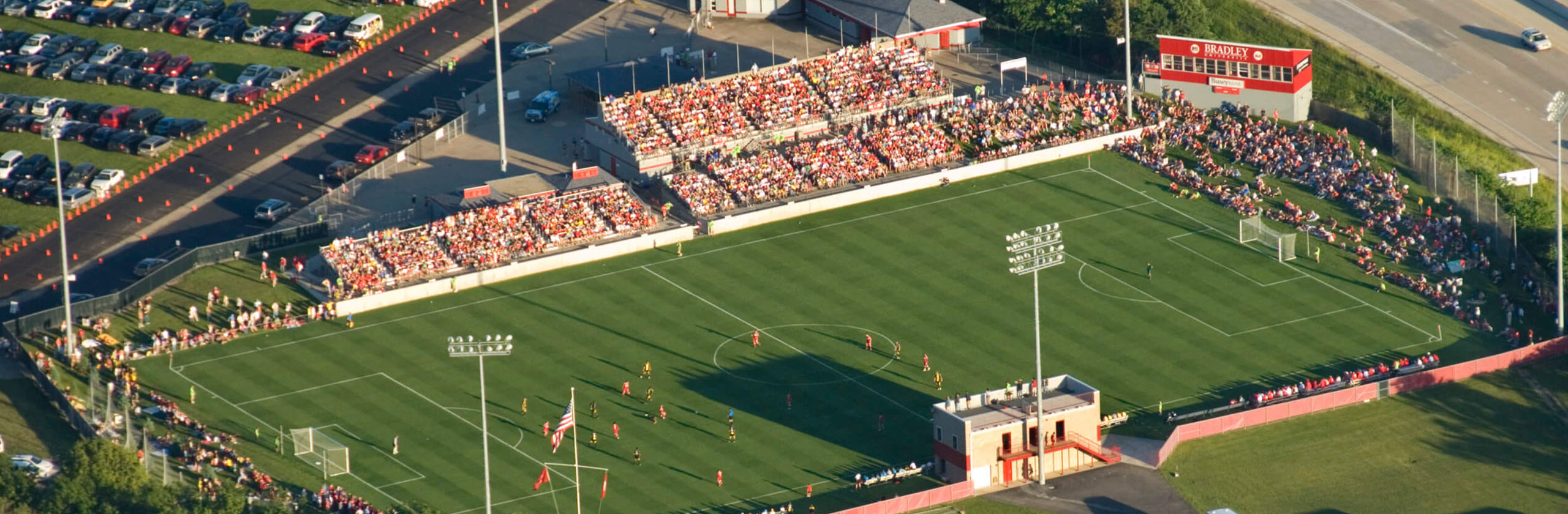
While purchasing tickets online in advance is the best way to ensure your ticket for a Peoria City game, club staff will continue to sell tickets on game days at the Shea Stadium entry gates with several options available:
Community End Zone (standing room only, restricted to the north end zone)
The first 50 guests seeking access to the Community End Zone on the Nebraska Avenue end of the game field at Shea Stadium will receive free admission. Additional tickets for this standing-room-only section will be available for $5. These tickets may be claimed only when gates open one hour prior to kickoff at Gate 4, located at the northeast corner of Shea Stadium adjacent to the light tower with the cellular phone equipment attached, and access will be granted only to the end zone. A satellite concessions/merch table and portable restrooms will be available.
General Admission – $8
Provides access to the main Shea Stadium grandstand, as well as the south (I-74 end) end zone with The 309 supporters group. General admission tickets may be purchased at Gate 2 beneath the covered entrance into Shea Stadium beginning one hour to the scheduled game time. Several group ticket options and experiences are available by emailing the club at peoriacitysoccer@gmail.com.
Field Side Grandstand – $15
Provides access to lawn chair seating on the field directly in front of the main grand stand. A satellite concessions table will be available. Field Side Grandstand tickets may be purchased at Gate 2 beneath the covered entrance into Shea Stadium beginning one hour to the scheduled game time.
Tailgate Parking – $5
Entry into the Crusens Tailgate Zone, the grass infield adjacent to Shea Stadium, will be available for $5 per vehicle. Reservations may be purchased online up to 3.5 hours prior to the game’s scheduled start time at which time online sales will close. Any remaining spaces will be sold upon arrival beginning 3 hours prior to the game’s scheduled kickoff time while spaces remain.